

Prerequisites: You’ll need an active Retell account and a Tuner account to follow this guide.
Overview
Connecting your Retell agent to Tuner follows this order: gather credentials from Retell, save your Retell API key in Tuner Workspace Settings first, then create your agent.Add your Retell API key in Tuner
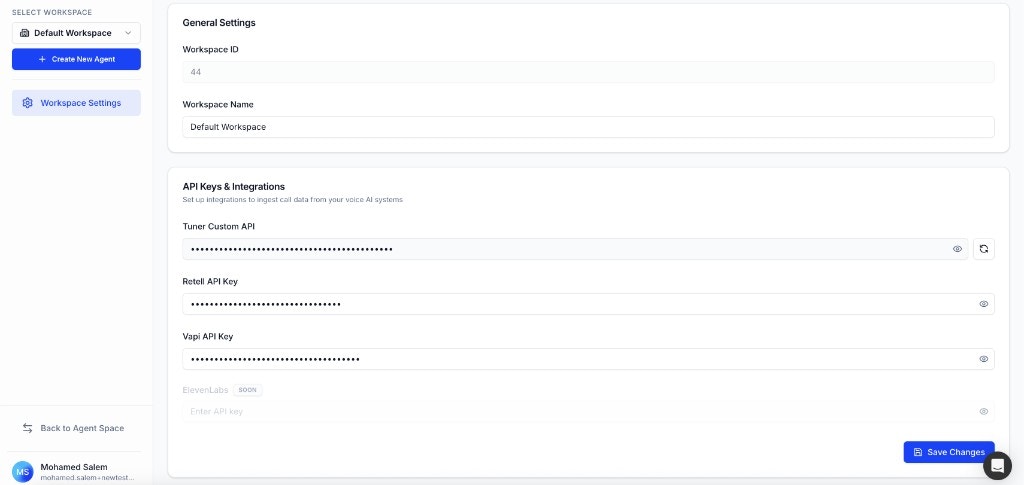
Paste the key under Workspace Settings → API Keys & Integrations and save — before you create an agent.
No Webhook Configuration Needed: Tuner automatically handles the webhook setup for you. After your Retell API key is saved and your agent is created with the correct Agent ID, Tuner will configure everything in the background.
Step 1: Get Your Retell API Key
Your Retell API Key lets Tuner authenticate with Retell so call data can be ingested into your workspace.- Log in to your Retell dashboard.
- Open Settings and go to API Keys (or your workspace’s API key section, depending on your Retell UI).
- Create a new key or copy an existing one.
- Keep the key safe — you will paste it into Tuner Workspace Settings in Step 3.
Step 2: Get Your Retell Agent ID
- Log in to your Retell dashboard.
- You’ll see a list of all your agents. Click on the agent you want to connect to Tuner.
- On the agent details page, locate the Agent ID displayed at the top of the page (it starts with
agent_followed by a string of characters). - Click on the Agent ID to copy it to your clipboard.
Step 3: Add your Retell API key in Tuner (before creating an agent)
Do this before you click Add New Agent, so your workspace is authorized to talk to Retell when you finish setup.- In Tuner, open Workspace Settings (gear icon in the sidebar).
- Under API Keys & Integrations, paste your Retell API Key into the Retell API Key field.
- Click Save Changes.
Step 4: Create your agent in Tuner
- Click the Select Agent dropdown in the sidebar and select Add New Agent.
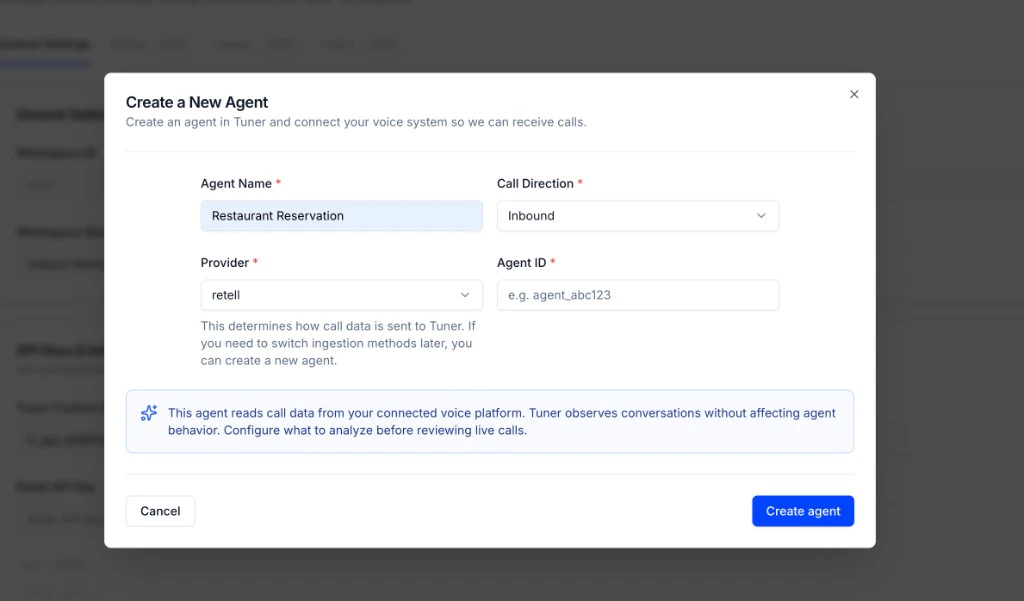
- In the Create a New Agent modal, fill in the required fields:
- Agent Name: A display name for this agent in Tuner.
- Call Direction: Inbound or Outbound, matching how this agent is used.
- Provider: retell — this tells Tuner how call data is ingested.
- Agent Remote ID: Paste the Agent ID you copied from Retell (for example
agent_…).
- Click Create agent.
Troubleshooting
Troubleshooting Common Issues
Troubleshooting Common Issues
🎉 Congratulations!
You’ve successfully connected your Retell agent to Tuner! Here’s what you’ve accomplished: ✅ Obtained your Retell API Key and Agent ID from Retell ✅ Saved your Retell API Key in Tuner Workspace Settings first ✅ Created your agent in Tuner with the correct Agent ID ✅ Tuner automatically configured the webhook connectionWhat’s Next?
Your Retell agent is now connected. All future calls will be automatically sent to Tuner for analysis.Developer Quick Start
Set up MCP or blank configuration and send your first call.
Configure via MCP
Use your IDE or chat app to generate outcomes, intents, evaluations, and alerts automatically.
How to Analyze Your First Call
A step-by-step guide to analyzing your first call.
Best Practices for Agent Monitoring
Learn how to effectively monitor your agent and catch issues early.